
Tracing the Edges
Why Semantic Search Isn't Enough—and What Structural Awareness Changes


You Found the Function. Now What?
Semantic search closes the gap between how developers think and how tools find code. You ask “how does authentication work?” and it returns verifyToken, SessionValidator, IdentityManager—functions that share no characters with your query but share everything conceptually.
In Thinking in Human, I wrote about the cognitive tax of navigating AI-generated codebases—the flood of code no one fully understands, the mental dictionary you rebuild every time you touch an unfamiliar repo. In Navigate by Meaning, I showed the practical side: how semantic search cuts token usage by letting AI agents orient by concept instead of guessing at filenames. If you haven’t read those, the short version is: we need tools that match how developers think, not how filesystems are organized.
This article is about what happens after you have that.
Because after months of using it on client codebases and my own projects—I hit another wall.
Semantic search works for finding—but it stops at the boundary of the result. It doesn’t show you what surrounds it, how it connects to the system at large.
You find authenticate(). Great. But who calls it? What does it call? If you change the return type, what breaks downstream? Is authenticate() a leaf node that nothing depends on, or the root of a tree that branches into every API handler in the system?
These aren’t semantic questions. You can’t answer them with embeddings. They’re structural questions—questions about how code connects.
And the more I watched AI agents work with semantic search, the more I realized: they hit the same wall, except harder. An agent finds the right function, reads it, understands it—and then has no idea where to go next. So it guesses. It greps for the function name. It reads files hoping to find callers. It re-reads files it already explored because it forgot it was there. The agent is doing the same manual tracing that semantic search was supposed to eliminate.
The Map vs. The Territory
Here’s an analogy that helped me think about this.
Semantic search gives you a map where every building is labeled by what it does. You’re looking for a hospital? There it is. A school? Over there. The labels are excellent. You can find anything by description.
But the map has no roads. No connections between buildings. You can see the hospital and the pharmacy, but you don’t know they’re next door to each other. You can see the school and the bus depot, but you don’t know there’s a route between them. Every building is an island.
In code, the “roads” are relationships. Function A calls function B. Module C imports module D. Class E extends class F. These relationships are the connective tissue of a codebase—they’re what makes it a system rather than a collection of files.
When you search for “authentication” and find authenticate(), you’ve found a building on the map. But to understand the authentication system, you need to see the roads:
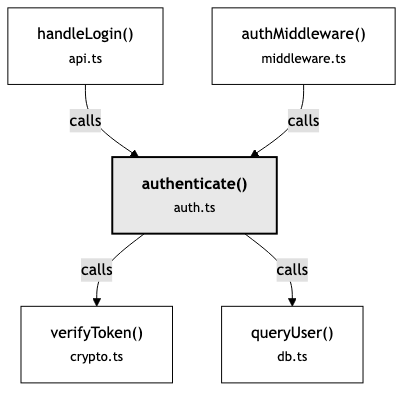
Now you see the shape of the thing. authenticate() isn’t just a function—it’s a hub. Two entry points feed into it. Two dependencies fan out from it. Change authenticate() and you need to think about four other pieces. That structural picture changes how you reason about the code.
Semantic search gives you what. Structure gives you how it connects. To understand a system, you need to trace the edges between the pieces—not just find the pieces themselves.
What Is a Context Graph?
Before going further, it’s worth grounding this. “Graph” gets thrown around loosely in tech—social graphs, knowledge graphs, dependency graphs. In this context, it means something specific.
A context graph is a data structure where every meaningful piece of code—a function, a class, a method, an interface—becomes a node. And every relationship between those pieces—this function calls that one, this module imports that one, this class extends that one—becomes an edge.
That’s it. Nodes and edges. Things and the connections between them.
What makes it a graph rather than a tree or a list is that the connections aren’t hierarchical. A tree has a root and branches downward. A file system is a tree—folders contain files, files don’t contain folders. Code doesn’t work that way. authenticate() calls verifyToken(), but verifyToken() might also be called by refreshSession(), which is called by handleRequest(), which calls authenticate() again. The relationships form cycles, fan-outs, and convergence points. That’s a graph.

Why does the shape matter? Because a graph lets you ask questions that other structures can’t answer:
“What’s near this?” — Given a node, show me everything one or two hops away. Trees only go down. Graphs go in every direction.
“How are these two things connected?” — Find the path between two nodes. Maybe
authenticate()andsendEmail()are four hops apart through a chain you didn’t expect.“What depends on this?” — Follow incoming edges backward. Everything that points to this node is potentially affected if it changes.
“What has the agent already seen?” — Track visited nodes. This is where the graph stops being a static map and becomes a tool for exploration.
The “context” in context graph is the key distinction. This isn’t a static call graph generated by a compiler. It’s a living structure that an agent navigates—visiting nodes, tracking where it’s been, deciding where to go next. The graph provides the terrain. The session provides the memory of how you’ve moved through it.
Think of it this way: a call graph is the subway map. A context graph is the map plus the moving dot—where you are, where you’ve been, and which stations you haven’t reached yet.
Remember the cognitive tax from Thinking in Human—the cost of manually translating concepts to code, rebuilding your mental dictionary every time you touch an unfamiliar codebase? The context graph is an attempt to reduce a different tax: the cost of manually tracing relationships that are already implicit in the code. The first tax is about finding. This one is about connecting.
There’s one more piece that makes this different from other graph-based code tools. Most static analysis graphs exist in isolation—you query them separately from search. The context graph is fused with semantic search. When you search for “authentication” and get results, each result comes with its graph neighborhood attached. You don’t search and then query the graph. You search and the graph comes with the answer. That’s what Navigate by Meaning described as the two-phase model—orient, then investigate—except now the orientation phase includes structure, not just relevance.
What Agents Actually Do (and Why It’s Expensive)
Let me trace what happens when an AI agent explores a bug without structural awareness.
The agent receives: “There’s a bug in the login flow—users get a 500 error intermittently.”
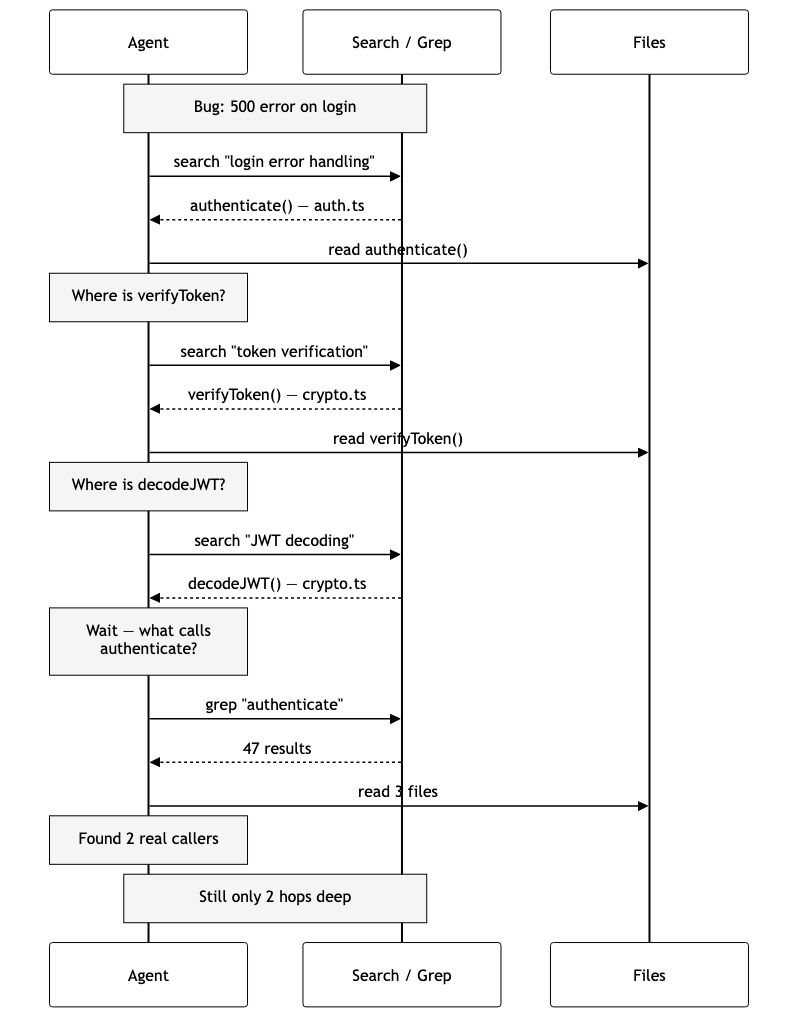
The agent searches, reads, searches again, reads again, remembers it forgot to check callers, greps, reads three more files — and it’s still only two hops deep. Every step is a new round trip. The agent is doing archaeology — digging through layers to reconstruct structure that existed all along but was never surfaced.
Now imagine the same agent with structural awareness:
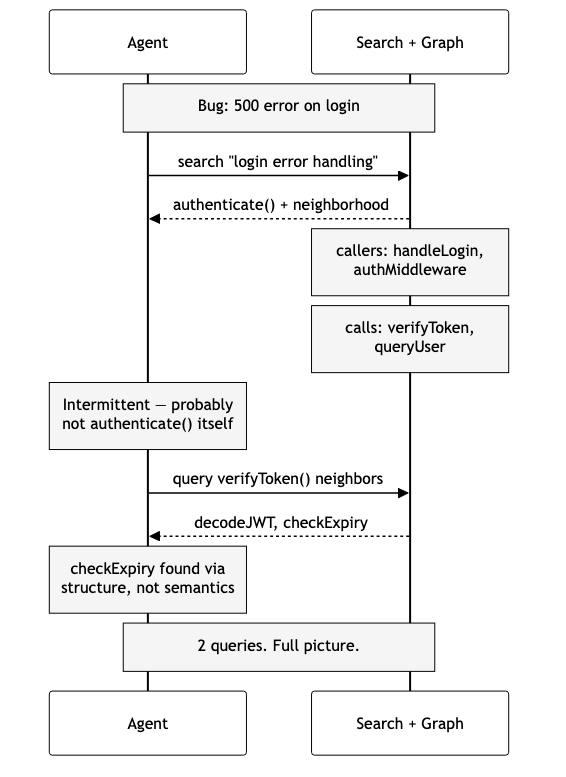
One search returns authenticate() and its graph neighborhood — callers above, dependencies below. The agent reasons from structure: “The bug is intermittent, so it’s probably not in authenticate() itself — that would fail every time. Let me check verifyToken() for timeout issues.” A second query fans out to decodeJWT() and checkExpiry() — a function the agent might never have found via semantic search because “expiry checking” doesn’t match “login error handling” semantically.
Two queries instead of many. The agent didn’t just find the right code faster — it reasoned differently because it could see connections instead of guessing at them.
Edges: The Vocabulary of Structure
When I started building this, I had to decide: what relationships actually matter? Code has infinite implicit connections. A function and its tests are related. A config file and the module that reads it are related. A comment and the code it describes are related.
Not all relationships carry the same weight for navigation. I settled on five that consistently help agents (and developers) reason about code:
Calls — Function A invokes function B. This is the backbone. Call edges let you trace execution flow forward and backward. “What does this function do?” (follow outgoing calls) and “Where is this function used?” (follow incoming calls).
Imports — Module A brings in Module B. Import edges map dependency structure. They answer “what does this file need?” and “what depends on this file?” When you’re planning a refactor, import edges tell you the blast radius.
Extends — Class A inherits from Class B. Inheritance edges surface the type hierarchy. When you’re debugging polymorphic behavior—”which implementation actually runs?”—these edges point you to the answer.
Implements — Class A fulfills Interface B. Similar to extends, but for contracts. When you change an interface, implements edges show you every class that needs to update.
Exports — Module A exposes Symbol B. Export edges are the public API surface. They distinguish “internal implementation detail” from “thing other modules depend on.”
Each edge is extracted during indexing by walking the AST—the same tree-sitter parse that already happens for semantic chunking. When the parser sees a function call node, it records a calls edge. When it sees an import statement, it records an imports edge. The overhead is minimal because the parse is already happening.
The key insight: edges are extracted at the symbol level first—function names, class names—and then resolved to specific code chunks after all files are indexed. This two-phase approach handles cross-file references cleanly. When api.ts calls authenticate(), the resolver looks up which chunk defines that symbol and creates a direct link.
Same-file references get higher confidence than cross-file ones. “The authenticate call in auth.ts probably refers to the authenticate function in the same file” is a safer bet than guessing it lives in utils.ts. A small heuristic, but it matters when a codebase reuses names across modules.
The Agent’s Memory Problem
Here’s something I didn’t anticipate when I first built semantic search: agents have no memory of where they’ve been.
Each tool call is stateless. The agent searches, gets results, reads a file, searches again. But between calls, there’s no record of “I already looked at authenticate()“ or “I haven’t checked the callers yet.” The agent carries this in its context window—which works until the conversation gets long enough that earlier exploration falls out of scope or gets compressed.
This leads to a specific failure mode I kept seeing: circular exploration. The agent finds authenticate(), follows a call to verifyToken(), sees a reference back to something in auth.ts, searches for it, and ends up back at authenticate(). It doesn’t realize it’s going in circles because it has no map of its own exploration.
Session memory solves this. When an agent starts exploring a codebase, it gets a session—a lightweight state that tracks:
Visited nodes — Where the agent has already been. This prevents re-exploration and lets the agent know “I’ve already read this, I can skip it.”
Frontier — Where the agent hasn’t been but probably should look. Every time the agent visits a node, its unvisited neighbors get added to the frontier with a priority score. Closer neighbors (one hop away) get higher priority than distant ones (two or three hops). The frontier is a ranked to-do list of “explore this next.”
Reasoning log — Why the agent made the decisions it did. When the agent leaves a note—”this function handles the happy path, need to find the error path”—that reasoning persists across tool calls. The agent can review its own logic, catch contradictions, and build on earlier observations.
Annotations — Per-node notes. The agent can mark a function as “likely root cause” or “ruled out” or “needs deeper investigation.” These annotations travel with the graph, so the next query that returns that node also returns the agent’s prior assessment.
The frontier mechanic is especially interesting. Without it, the agent has to decide where to go next based on whatever’s in its context window. With it, the agent can ask “what’s on my frontier?” and get a prioritized list of unexplored neighbors, ranked by structural proximity to where it’s been. It’s the difference between wandering and navigating.
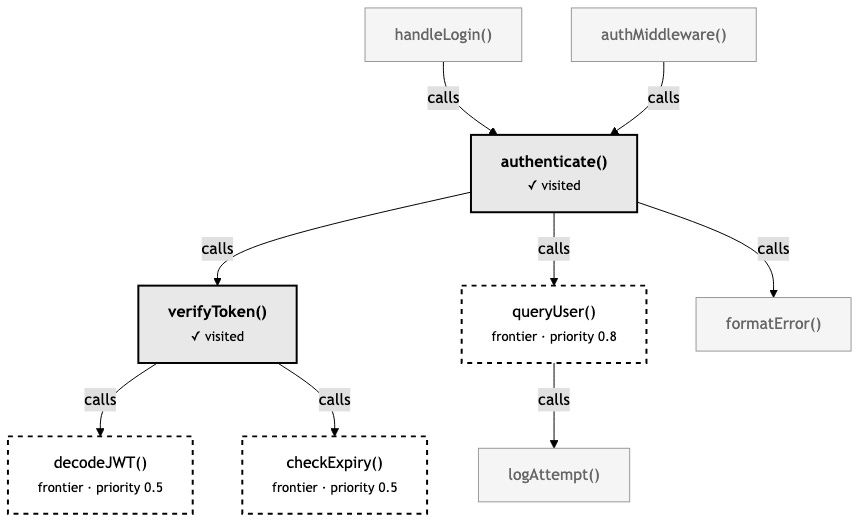
Sessions are ephemeral—they live in memory, not on disk. They’re tied to a task, not the codebase. When the agent finishes investigating the login bug, the session disappears. This is intentional: the graph is permanent (it’s the codebase structure), but the exploration state is temporary (it’s the agent’s current task).
Why Not Just Use a Language Server?
This was the first question I asked myself. LSP already provides “go to definition” and “find references.” Why build something separate?
The answer came from the difference between an IDE and an agent harness. A developer clicks “go to definition.” An agent makes a tool call, gets text back, and decides what to do next — with no memory of where it’s already been.
Agents need neighborhoods, not single hops. LSP answers “where is this symbol defined?”—one hop. To reconstruct a call chain three levels deep, you’d make a dozen LSP calls, each returning one result. The graph gives you multi-hop traversal in a single query. An agent exploring a bug needs the full neighborhood around a function, not a breadcrumb trail.
Agents need exploration state. LSP is a live service that answers questions about the current state of code. It doesn’t track “what did the agent already explore?” or “what changed since the last time we looked?” The context graph layers temporal awareness (stale nodes) and exploration memory (sessions) on top of structural data.
Agents need combined signals. The real value is returning two things at once: “this code is semantically relevant to your question” AND “this code is structurally connected to what you just found.” LSP gives you structure in isolation. Semantic search gives you meaning in isolation. The context graph gives you both in one query.
LSP is excellent at what it does. The context graph isn’t trying to replace it—it’s a complementary layer built for a different consumer: AI agents navigating codebases across multi-turn conversations.
Change Propagation: Seeing the Blast Radius
One capability that fell out of the graph naturally: understanding the impact of changes.
When a file is modified, the watcher re-indexes it—new chunks, new edges. But it also marks downstream nodes as stale. If auth.ts changes and api.ts calls functions from auth.ts, the nodes in api.ts get flagged.
This is useful in two scenarios:
During development: The agent modifies authenticate() and then asks “what might be affected?” Instead of searching blindly, it checks the graph for stale nodes. The graph returns: handleLogin() and authMiddleware() depend on the changed code. The agent can verify those callers still work, without manually tracing the dependency chain.
During review: A PR touches three files. The reviewer asks “what’s the blast radius?” The graph shows not just the changed files but the structural neighbors—code that’s one or two hops away from the changes and might need attention. It’s like git diff but for impact, not just changes.
This is where the graph starts to feel less like a search enhancement and more like a thinking tool. It doesn’t just help you find code—it helps you reason about consequences.
What I Learned Building It
A few things surprised me.
The graph is tiny. I expected the SQLite database to be a meaningful fraction of the vector index. In practice, it’s 5-10% the size. Nodes and edges compress well. The performance characteristics are absurd—sub-millisecond for most queries, even with multi-hop traversal. SQLite with prepared statements and WAL mode is dramatically overqualified for this workload, which is exactly what you want.
Edge extraction is almost free. Because tree-sitter is already parsing every file for semantic chunking, extracting edges from the AST adds roughly 10-15% to indexing time. The parser has already done the hard work of understanding the code structure. Walking the AST for call expressions and import statements is a thin additional pass.
Session memory changes agent behavior more than the graph itself. This was the real surprise. The graph provides structural context, which is valuable. But the frontier—the ranked list of “here’s what you haven’t explored yet”—changes how agents navigate at a fundamental level. Without it, they wander or follow whatever looks interesting. With it, they explore strategically. The quality of investigation went up measurably.
Graceful degradation is non-negotiable. The graph is opt-in. If SQLite fails to initialize—wrong permissions, disk full, whatever—semantic search keeps working without it. The graph tools simply don’t appear. Sounds obvious, but it required discipline: no code path in the core system can depend on the graph being available. New capabilities should expand what’s possible, not create new ways to break.
The Three Layers
Looking back at the full series, there’s a progression in how we help developers and their AI agents understand code:
Layer 1: The human dimension. The cognitive tax, the flood, staying in the loop. Understanding why better tools matter—not just technically, but for the developers using them. Without this, you’re building solutions to problems no one has articulated. (”Thinking in Human”)
Layer 2: Meaning. Semantic search. Find code by what it does, not what it’s named. This is the practical foundation—navigate by concept instead of pattern-matching strings in a codebase that doesn’t follow your naming conventions. (”Navigate by Meaning”)
Layer 3: Structure. The context graph. Relationships between code. How functions connect, how changes propagate, how an agent remembers where it’s been. This is what turns search results from isolated fragments into a navigable map. (This article)
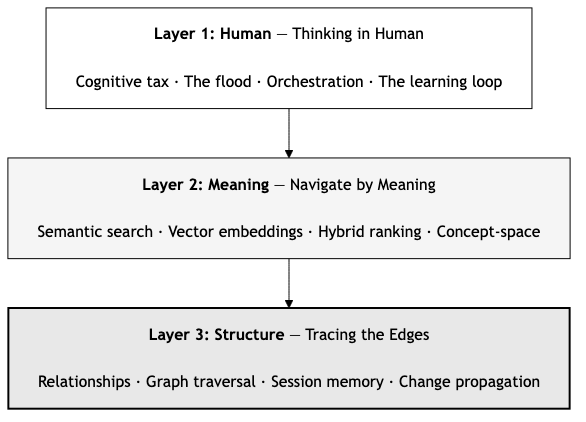
Each layer builds on the previous. Meaning without structure gives you fragments. Structure without meaning gives you a graph you can’t query naturally. Both together give you something closer to how an experienced developer actually understands a codebase—not just “where is the authentication code?” but “how does authentication flow through the system, what depends on it, and what happens if I change it?”
Where This Goes Next
The graph as it exists is a foundation. A few directions I keep thinking about:
Semantic edge weights. Right now, a calls edge between authenticate() and verifyToken() has the same weight as one between authenticate() and logDebug(). But the first relationship is architecturally significant. The second is noise. Using embedding similarity between connected nodes to weight edges could surface the relationships that actually matter.
Cross-repository graphs. When import { authenticate } from '@myorg/auth' appears, the edge currently dead-ends at the package boundary. Linking graphs across repositories would let agents trace dependencies into shared libraries—which is where a lot of real-world bugs actually hide.
Graph-weighted search. If the agent is deep in the authentication module, search results from structurally adjacent code should rank higher. This is the convergence point: semantic similarity and structural proximity as combined signals. The search doesn’t just find relevant code—it finds relevant code near where you’re already working.
Multi-agent collaboration. Multiple agents sharing a graph with separate sessions. Agent A investigates the frontend authentication flow. Agent B investigates the backend. Each maintains its own visited nodes and annotations. But they can see each other’s reasoning—”Agent A already ruled out the token refresh logic.” Collaborative exploration of large codebases.
These aren’t distant futures. The foundation supports all of them. The graph schema, the session model, the edge types—they’re designed to extend.
Takeaways
Code is not a collection of files. It’s a network of relationships. Functions call functions. Modules import modules. Classes extend classes. The meaning of any single piece of code is inseparable from its connections.
Semantic search was the first step: finding code by what it means. The context graph is the second: understanding code by how it connects. Together, they give AI agents—and the developers who work with them—something closer to real comprehension.
The flood isn’t slowing down. The codebases aren’t getting smaller but the tools are getting smarter—not just at finding the right code, but at understanding the shape of the system it lives in.
That’s what it means to trace the edges. Not just finding the right code—following the connections that make it a system.
This is Part III of a series on navigating code in the AI era.
Part I, “Thinking in Human,” explores the cognitive cost of the AI flood and why staying in the loop matters. Read it here →
Part II, “Navigate by Meaning,” covers semantic search and how it cuts AI token usage by 67%. Read it here →
The context graph feature is available in semantic-code-mcp